Free and open source · 0.2.7 on GitHub Releases

The free, open-source CapCut replacement.

Auto-captions, text-to-speech, background removal, keyframes, effects, titles and multi-track cutting, up to 4K. All of it on your machine: no watermark, no account, no subscription.

Download for Windows All platforms

Windows, macOS, Linux, Android and iOS. Nothing uploads.

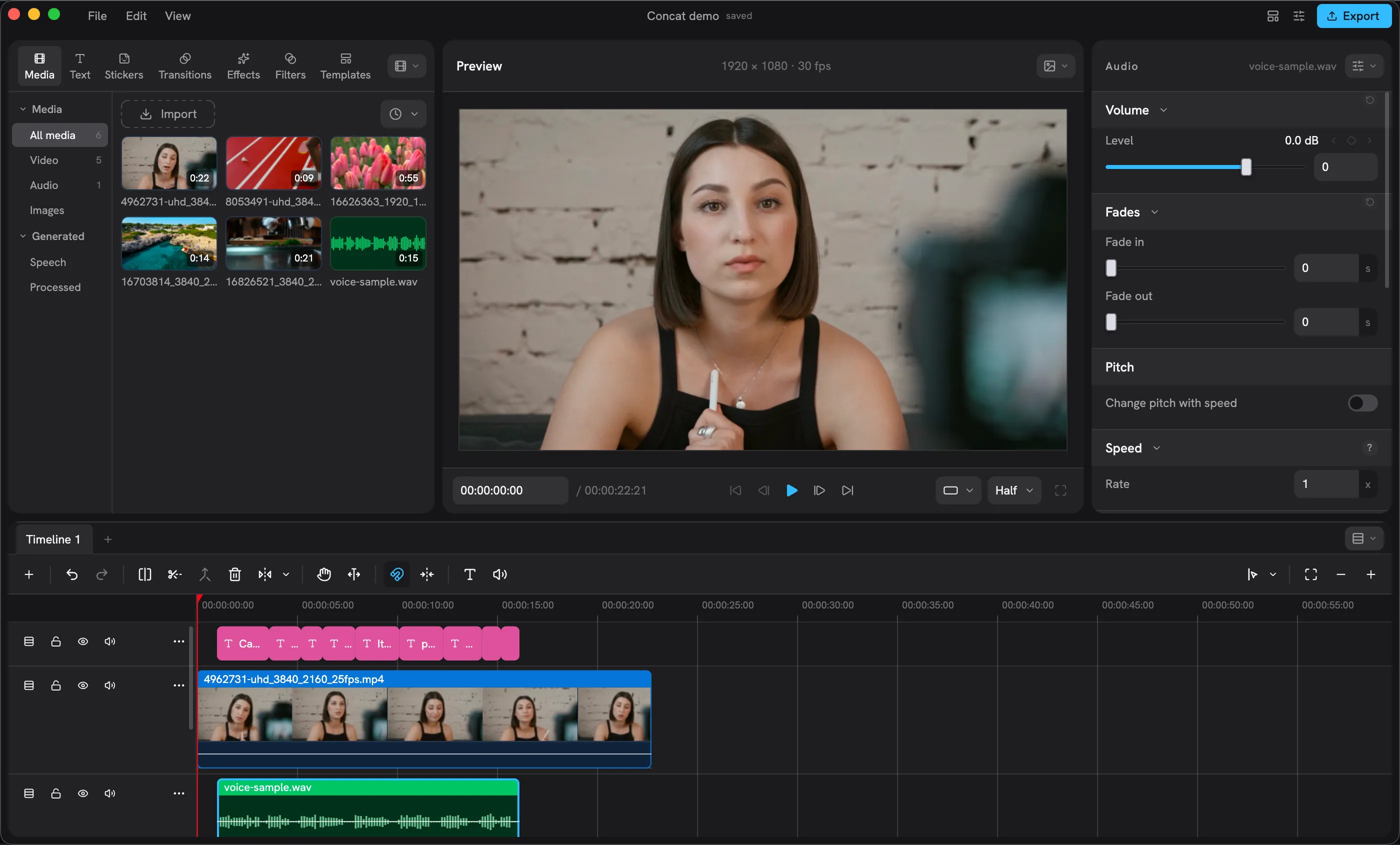
The Concat editor: media library on the left, the monitor with a generated caption in the middle, the text inspector on the right and a multi-track timeline below

Everything people open CapCut for. None of the catches.

  • 78K+

    Downloads from GitHub Releases

  • 5.2K

    Stars on GitHub

  • 170+

    Effects, filters, transitions and text animations

  • 14

    Languages in the app

A tour of the window.

Four panes, one screenshot, nothing mocked up. Scroll and the picture follows.

The Concat editor window
  1. 01

    One window, four panes.

    Library on the left, the monitor in the middle, the inspector on the right, the timeline underneath. Every pane can be swapped, split or dragged somewhere else.

  2. 02

    The Library.

    Media, Titles, Stickers, Effects, Filters, Transitions and Templates as pages. Import footage, then single-click a filter to audition it on the monitor or drag it onto a lane.

  3. 03

    The monitor.

    Scrub, play, step frames. Drag a title or a clip around in the picture; its position, scale and rotation follow. Quality switches between full, half and quarter.

  4. 04

    The inspector.

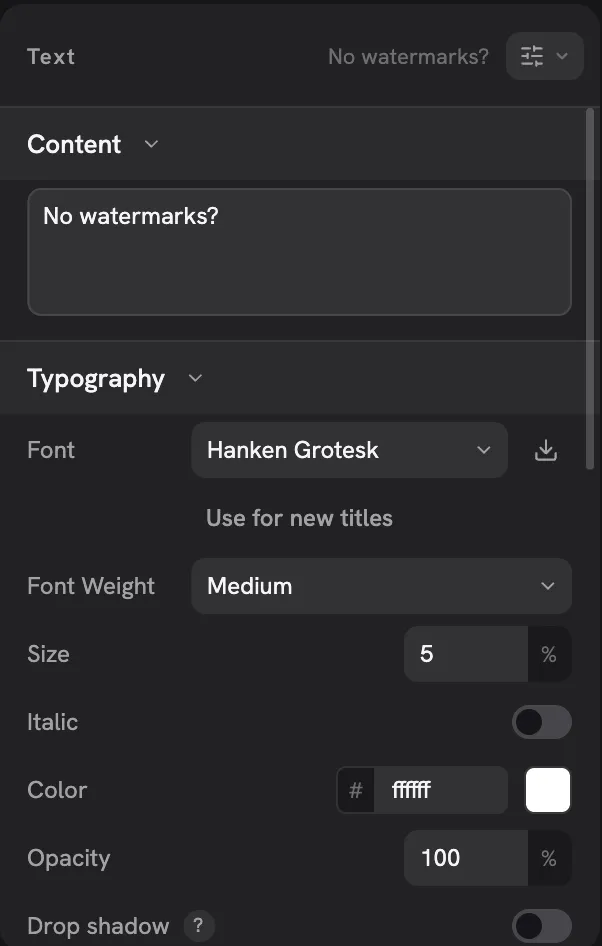
    Everything about the selected clip: Text, Effects, Adjust, sound. Font, weight, size, colour, shadow and a background plate for titles, with keyframes a diamond away.

  5. 05

    The timeline.

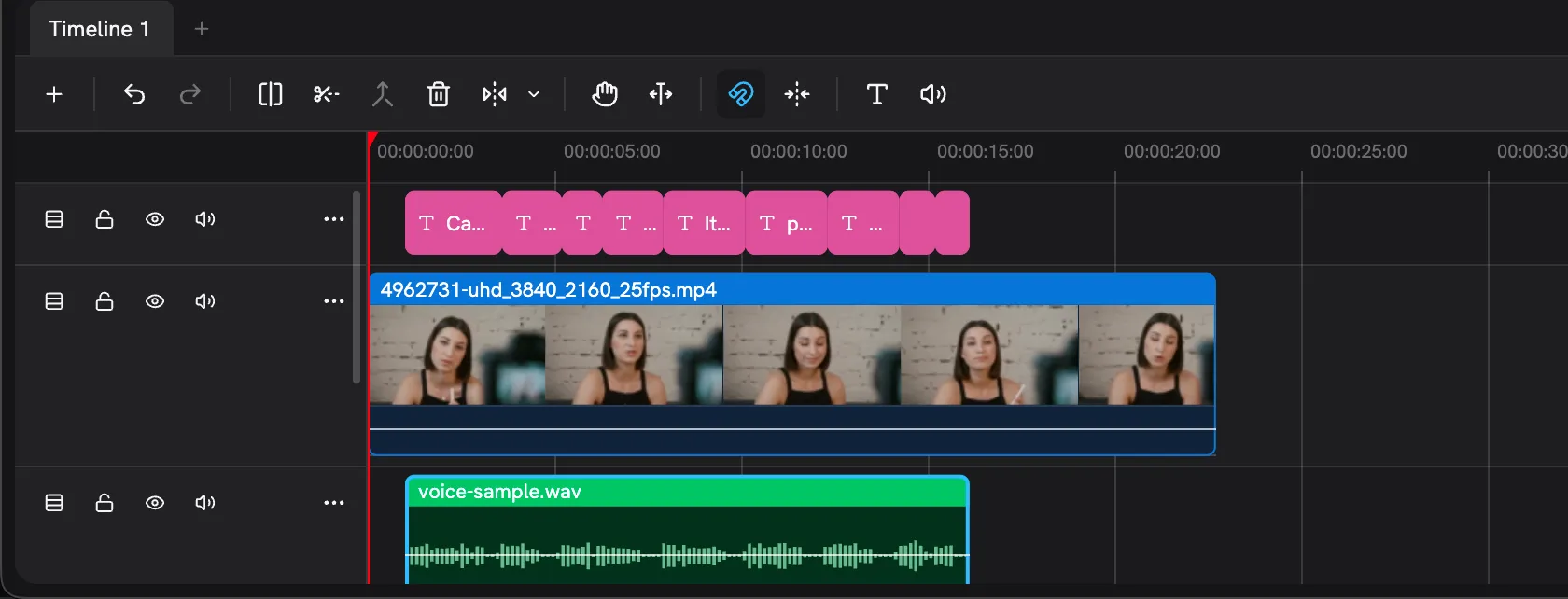
    Several tracks, several timelines per project. The tray under the tabs holds split, the razor, the magnetic switch, Text to Speech, Record Voiceover and Generate Captions.

Built for the edits people make every day.

Captions, voices, titles and effects on a multi-track timeline, rendered by a native Rust engine with a GPU compositor.

  • The timeline with a lane of generated captions above the video and the voice clip

    Auto-captions, offline.

    Local Whisper transcribes on your machine and puts styled captions on the timeline, one title per phrase or per sentence.

    How captions work
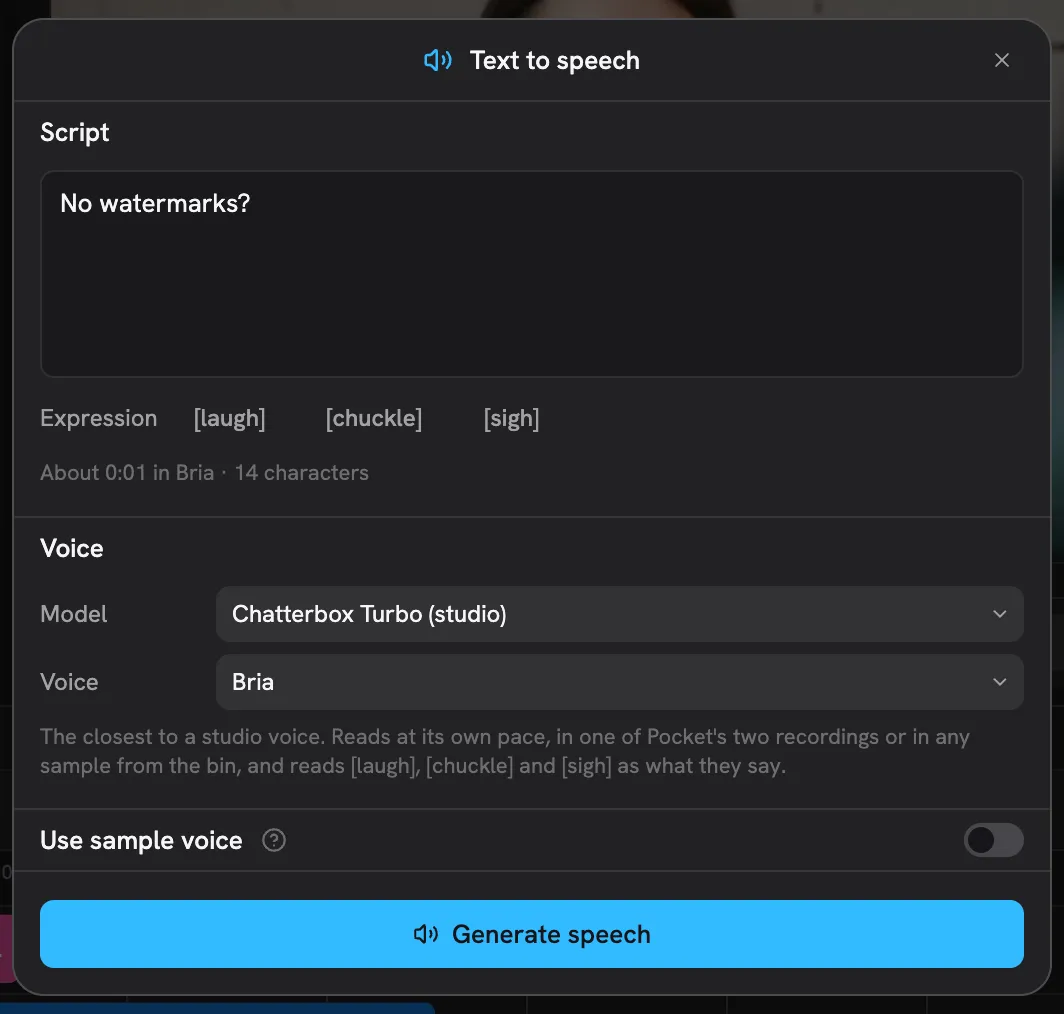
  • The Text to speech sheet with a script, the model and voice pickers and the Generate speech button

    Text to speech and voice cloning.

    Built-in speakers that are quick, or any voice from a few seconds of a recording. The result lands on the timeline.

    Generate a voice
  • Background removal.

    A person, an object, or paint the mask yourself with a smart brush. No green screen needed.

    Remove a background
  • Keyframes with a curve editor.

    Position, scale, rotation, opacity, volume and effect parameters. Ease in, ease out, or draw the curve.

    Animate anything
  • The Text inspector with font, weight, size, colour, shadow and background settings

    Titles that look designed.

    Fonts, stroke, shadow and a background plate, with presets to start from. Style many titles at once.

    Add titles
  • 4K export, 10-bit, no watermark.

    H.264, HEVC and AV1 up to 4K 60. Hardware encoders where the machine has them. Presets for YouTube and for small files.

    Export a video

Also: 170+ effects, filters, transitions and text animations, chroma key, colour wheels and curves, one-switch voice cleanup, multi-timeline projects, stickers and shapes. Every feature, on GitHub

Two ways in, the same engine.

For people who edit

Install it, drop footage in, cut.

Account
None. Nothing to sign up for and nothing to renew.
Upload
None. The engine, the models and your footage stay on your disk.
Watermark
None, at any resolution. There is no paid tier to unlock and never will be.

For scripts and agents

Anything the window can do, a program can do.

API
JSON-RPC over stdin or a socket, gRPC over HTTP/2, and MCP for AI agents.
CLI
Create, import, edit and export from a shell.
Same engine
Same commands, same clamps, same refusals as the editor. A method added to the API reaches every transport.

Runs everywhere.

macOS, Windows, Linux, Android and iOS. Every build is a GitHub Releases asset with a checksum. Current version 0.2.7.

Operating system

All releases/SHA256SUMS/Install guide

Contact.

Sponsoring starts with a message. Tell us about you or your company and how you should appear on the repository and this page.

Discord

Join the Concat server and send a message. Questions and bug reports are welcome there too.

Join the server

Contribute

Use a build and say where it breaks, or pick up an issue. CONTRIBUTING covers setup, the layout of the tree and the checks to run.

Read the contributing guide

Roadmap

What comes next, what sponsorship pays for, and what each piece costs.

See the roadmap

Questions, answered.

Anything else, ask on Discord or read the guides.

Is Concat really free?

Yes. No watermark, no account, no paid tier, and the code is AGPL-3.0. Sponsorship is what stands in for a subscription, and it is optional.

Does anything leave my machine?

No. Editing, captions, voices and cutout all run locally. The optional models download once from Settings and work offline after that. Logs stay on disk unless you attach them to an issue yourself.

Where is the text-to-speech button?

On the timeline tray, the row of tools under the timeline tabs: the Text to Speech button opens the speech sheet. The first time, download a voice model from Settings › Speech.

The text-to-speech guide
macOS says the app is damaged or cannot be opened.

The macOS builds are unsigned. Move Concat to Applications, then clear the quarantine flag once:

xattr -dr com.apple.quarantine /Applications/Concat.app
How do I install it on iPhone or iPad?

iOS is in beta and is not on the App Store. Download the IPA from the picker and install it by sideloading.

What hardware do I need?

Minimum: any 64-bit processor from 2013 or later, 4 GB of RAM and 500 MB of storage, with no GPU required. For smooth 1080p editing and quick 4K exports: 6 cores or more, a GPU with Metal, DirectX 12 or Vulkan, and 16 GB of RAM.

System requirements
Where does sponsorship money go?

The roadmap lays out what sponsorship pays for and what each piece costs. Every sponsor gets a place on the repository and on this page for the months they sponsor.

See the roadmap

Ready to cut?

Download for Windows All platforms

Free, open source, 0.2.7. No account, nothing uploads.